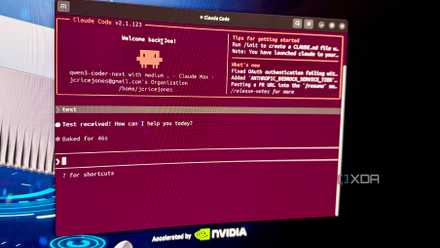


I’ve been paying for multiple AI coding tools for months to evaluate them all, including Cursor Pro. Meanwhile, the 32GB Nvidia RTX card in my PC has largely been sitting idle, other than loading the occasional local model via LM Studio. Every time I hit my token limits, I’d say that I’d get around to wiring in the local models at some point, but that’s easier said than done with Cursor.
Now, I did eventually do that, but with another tool. But before I got to that stage, I rounded up a bunch of open-source AI coding tools and priced out my options to see if going local was worth the changeover. I went through OpenCode, Pi,Zed, and Crush, and ended up changing my subscription (to none), my setup, and adopting a new way of working that aligns with how I want to code.

The AI coding race just changed
Most of the talked-about Cursor alternatives aren’t really Cursor alternatives
While some are actually editors, most are terminal agents, and none of that is Cursor’s fault
Before we get into what I kept, I should clear up a few things that cause most of the bad advice you’ll see elsewhere. Cursor started out as a VS Code fork and, as such, is a graphical editor. Most of the open-source tools that get held out as replacements aren’t editors; they’re terminal agents. Zed is the closest to a straight swap out of the ones I’ve used extensively, while Pi, OpenCode, and Crush all live in your shell, next to your editor. If you need a graphical editor, look at Zed. Otherwise, it depends on what your preferences are for the terminal agents.
Now, I use Zed if I need a graphical editor. I’ve always liked the Atom team, and this is a fantastic editor that’s GPU-rendered and written in Rust, so it’s so much speedier than Electron-based tools. It’s also half the price of Cursor Pro, or free if you already have API keys to local or cloud LLMs or harnesses like Claude Code. Plus, the personal (free) plan gives you 2,000 accepted edit predictions per month, which is a lot if you aren’t a heavy coder.
The trio of terminal agents here is split more by personality than features. OpenCode is the most mature, with the largest community and an optional $ 10-per-month subscription that bundles DeepSeek, GLM, Kimi, and other Chinese open-weight models if you’re not using your own API keys. Crush is OpenCode but with the Charm polish and mid-session model switching (which is my favorite feature). Pi is the minimalist, with only four built-in tools and a 300-word system prompt, so you can build the system you need.
All support MCP and BYOK. But there’s one thing that rarely gets mentioned in comparison tables: whether the tool can send routine work to a local model and switch to a frontier model when the task needs it. Cursor can’t, because Tab and Apply-from-Chat run on Cursor’s own models, and you can’t change that. Zed can, but you have to set it up. The three terminal agents were built to do this.
I landed on Crush, and it wasn’t the obvious choice
It’s Charm-ingly polished, but the local LLM situation sealed the deal

I have an assortment of RTX GPUs with high VRAM amounts on hand, and LM Studio is already set up on my Windows box for other experimentation. That would bring the cost of routine coding tasks down to the price of electricity if I can route them to a local endpoint. Most tools can’t, or do it grudgingly. Crush does it by default, and the way I would have implemented it myself.
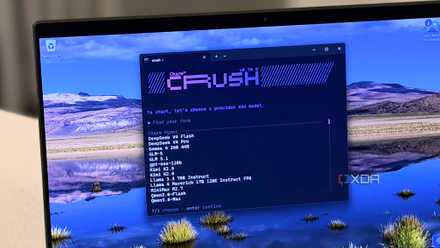
I drop my LM Studio details into the provider config file, and Crush auto-enumerates every model it can see. No hand-coding each model into the tool, no per-model YAML entries, and no editing required when I download a new model. I use Qwen 3.6 27B for most tasks now, and it just shows up on the /model menu next to all the cloud providers Crush can use.
But the killer feature is that I can switch mid-conversation to a different model, without losing context. Local model for most things, then switch to Opus or Sonnet (or Fable while I can access it) when the local model gets stuck, or I need some serious planning chops. Then I can flip back to the local model after getting the one answer I needed, saving me API call costs.
The icing on the cake is how good the TUI is. Charm has impeccable taste for creating easy-to-read, usable TUIs, and Crush is no different. I can read diffs and prompts without squinting at monochrome, which makes my eyes happier. Oh, and it has MCP transports, so all of my existing MCP servers that I set up in Claude Code dropped in without my intervention, and I can manage my home lab with ease.
Leaving Cursor wasn’t without cost
Tab completion is the thing I miss most and it’s not even close

I’ll be honest here, I’m not on board with the absolutes the switching crowd likes to say. Sure, saving $240 a year on subscription costs is good. But the switch isn’t without other costs, and wouldn’t have been possible if I didn’t already have a good GPU. If you rely on the core features of Cursor, leaving will hurt, and you might want to consider how much time it saves you compared to the subscription cost.
The biggest pain point for me is losing tab completion. Cursor’s tab completion is genuinely magic, predicting the next edit, not just the next part of the variable. Zed’s Zeta (an open-weight next-edit model with low latency) isn’t in the same league, though it works well enough. The first couple of weeks using Crush was a genuine slowdown because tab completion was halving my coding time before.
Composer is also something I miss. Terminal agents can also run multi-file surgical edits across the whole codebase, but Cursor keeps things on track. Yes, I can still do that with agentic coding, but I have to be more specific and start by having the agent build the skills that Cursor ships with.
And if I wasn’t running local LLMs on a GPU I’d already paid for, I would have genuine anxiety about token costs. API pricing is variable and volatile, and there are no safeguards to stop you from burning through a hefty amount. Most of my work is done by Qwen models running locally, but I still have to reach out to frontier models occasionally, and the fixed cost of Cursor makes more sense for some users.
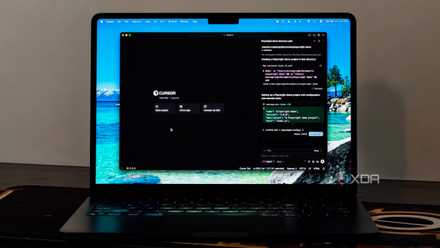
I stopped using Cursor to write code, and that’s when it actually became useful
Cursor became useful when I stopped chasing code
Cursor is still a good tool, it just doesn’t fit my workflow anymore
The main reason I ended up on Crush wasn’t that Cursor is a bad tool. It’s not, but it’s designed as an old-style IDE that has AI agents plugged in, and really needs the subscription to be powerful enough for longer projects. I’ve already got an RTX GPU sitting idle 90% of the time, LM Studio with a wide range of downloaded models, a stack of MCP servers wired into my home lab, and a routing philosophy that I’ve been talking about for months. Crush fits all of my current infrastructure where it already is. Cursor never wanted to touch my stack.