





My smartphone hotspot gets a lot of use when I’m working out of the house or traveling. It’s often a better and more secure option than public Wi-Fi.
It took some time, but I realized my default hotspot settings weren’t delivering the best Wi-Fi experience. On my Motorola Razr Fold, I was regularly hitting around 30-40Mbps, which isn’t terrible, but also isn’t great.
But after tweaking my default smartphone hotspot settings, I was regularly pushing towards 70Mbps and beyond — this is what you need to tweak.
Force the 5GHz band
You’re always close to your hotspot, so use the faster band

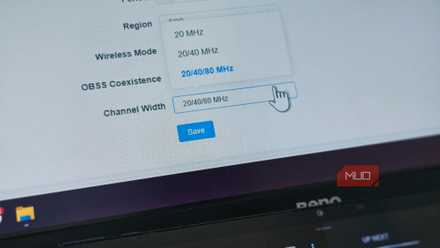
Wi-Fi broadcasts on two bands: 2.4GHz and 5GHz. Well, three bands now, including the newest 6GHz band, but most smartphone hotspots can’t do that yet (more on this in a moment!). Most smartphones are still limited to two bands. 2.4GHz travels further but is slower, while 5GHz broadcasts on shorter distances but is faster.
Many folks don’t realize that you can set your smartphone hotspot to use either band, giving your hotspot a speed boost if you use the 5GHz band. The reasoning behind using the 5GHz band exclusively is that most of the time, you use your hotspot next to you, or at least very nearby. That means you can use the faster but shorter-ranged band, as you’ll always be near the point of broadcast.
- Android: Head to Hotspot > Hotspot Settings > AP Band/Speed & Compatibility/Network Config, and toggle 5GHz only. The menu names will vary on Android devices, but those are the rough steps you need.
- iPhone: It’s easier on iOS’ unified approach, so head to Settings > Personal Hotspot, then toggle off Maximum Compatibility. This is basically Apple’s way of saying “no more 2.4GHz.”
The small catch is that if you do wander away from your hotspot, you may struggle for Wi-Fi coverage and experience slower speeds, so make sure you’re switching when appropriate.
6GHz smartphone hotspots

While most smartphones are limited to 2.4GHz and 5GHz, Google Pixel models in the US can actually use the newer 6GHz band for a hotspot. This is limited to the Pixel 9 and 10 series. The 6GHz mode also requires that the receiving device have 6GHz Wi-Fi support, which means it must support Wi-Fi 6E or Wi-Fi 7.
In November 2025, Android Authority reported that Google is working on a combined 2.4GHz and 6GHz mode to provide broader support for legacy devices stuck on 2.4GHz and modern devices that will increasingly use 6GHz.
This is expected to land in a future Android update, and as per Android Authority, it was being tested in an Android Canary build at the time of writing.
Furthermore, there is no similar option currently available in iOS.
Use Wi-Fi 6
If it’s available, turn it on

The latest smartphones can actually enable another Wi-Fi hotspot boosting option: Wi-Fi 6. By default, most smartphone hotspots default to Wi-Fi 5, an older, slower Wi-Fi standard. But modern smartphones have the option of using Wi-Fi 6, enabling faster connectivity.
On Android devices, in the same menu as the 5GHz band toggle, you may also see an option for Wi-Fi 6. If this is available, switch it on. It gives you faster data throughput and the option to use WPA3 security protocols on your smartphone.
Unfortunately, Apple doesn’t provide a way to expose this option in iOS, which means the 5GHz option is your best bet to boost speeds.
Force your phone onto 5G
Maintain faster speeds for a better hotspot
If you can, you should also force your phone to use a 5G connection rather than swapping between 5G and 4G LTE or similar. Most places have long since migrated to 5G, but at times, your phone will fall back to 4G if that’s all that’s available.
- Android: On your Android device, head to Settings > Network & Internet > SIMs > Preferred network type, and choose 5G.
- iPhone: On an iOS device, head to Settings > Cellular > Cellular Data Options > Voice & Data and select 5G On.
Now, that ensures you’ll use 5G, which, in combination with the 5GHz band set earlier, should boost your hotspot speeds.
Before moving, though, a caveat on assigning purely 5G connectivity. This is a great option if you know you’ll be using 5G the whole time. But “5G On” means just that: no 4G fallback. So if you’re unsure about what sort of cellular connectivity you’re using, allowing your smartphone to move between 4G and 5G is actually preferable for a consistent connection, rather than blazing fast, then absolutely nothing if your reception drops.
In most cases, 5G Auto is the better choice, because it allows that natural fallback, but also automatically upgrades when available.
Switch off data saving, low-power modes, and data backups
Crank it up to 11

The final hotspot tweak to make is your battery and data modes. In both cases, running them with restrictions will actively harm your hotspot’s connectivity.
These aren’t necessarily default options you can tweak, but most people run their devices with data and battery saving modes enabled. That’s why it’s worth remembering to turn them off when your hotspot is on.
Another consideration is data backups on your smartphone. If your smartphone is attempting to back up 5GB of photos, that’s all the data competing with your hotspot for bandwidth, making your connection worse. When your smartphone hotspot is active, turn off anything of that nature to give your hotspot maximum capacity.
I’ve changed my default hotspot settings, and it’s better than ever
These smartphone hotspot settings are absolutely worth tweaking, even if you’re not a frequent hotspot user, because it’ll make your life better on the occasions you do.
I would just say to watch the forced 5G option because you don’t want to end up with a hotspot that doesn’t work at all, and it really depends on your locale and reception. Similarly, closing down your background services and backups is worth doing if you remember, as that can have a surprising impact on your speeds.

- SoC
-
Qualcomm Snapdragon 8 Gen 5
- RAM
-
16GB
- Storage
-
512GB
- Battery
-
6,000mAh silicon-carbon
- Operating System
-
Android 16
- Front camera
-
32MP external, 20MP internal
The Motorola Razr Fold is a formidable challenger to Google and Samsung foldables in the U.S., complete with a 6,000mAh silicon-carbon battery and stylus support on both of its screens. It packs slick Pantone colorways and an 8.1-inch foldable OLED display. Plus, it can charge at a whopping 80W over a cable and at 50W wirelessly.