




Smart speakers come in all shapes, sizes, and price points—you can even make your own. But before you put one in your home (or another one), there are a few important questions you should ponder.
Can you use it with your smart home platform of choice?
Match the speaker to the ecosystem
By far the most important question you need to ask is whether or not the smart speaker works with your smart home and other devices. If you’re all-in on a system from Google or Amazon, then picking a Nest or an Echo speaker makes a lot of sense on the surface. It will just slot into your existing setup, no worries. The same is true of anyone who uses Apple Home and the HomePod.
Things are a little trickier if you have yet to commit to a smart home ecosystem, so make sure you pick something that gives you room to grow. Failing this, matching your smart speaker with other devices like smartphones and tablets will make secondary functions like casting media a little easier.
For anyone using Home Assistant, the choice is a bit harder. Home Assistant users can pick the Home Assistant Voice (or build one themselves), but opting for Google Nest or Amazon Echo devices either requires the Home Assistant Cloud subscription or some complex setup procedures. The same is true of other speakers that use Google and Amazon’s voice assistants.
You can technically use a HomePod with Home Assistant, but this requires the use of HomeKit Bridge to mirror your Home Assistant setup within Apple Home. It works well, but it isn’t everyone’s idea of a good time.

- Brand
-
Amazon
- Display
-
2.83” touch screen
The 2024 Amazon Echo Spot is a versatile smart display with a 5.5-inch touchscreen, ideal for video calls, streaming, and controlling smart home devices. With Alexa built-in, enjoy hands-free voice commands, rich sound quality, and seamless integration with your daily routines.
Are you paranoid about privacy?
Some providers keep your voice recordings on file

Smart speakers are always listening, primarily for a wake word like “Hey Siri” or “Ok, Nabu.” When they recognize a wake word, whatever you say next will be captured, analyzed, and (hopefully) acted upon. There are some smart speakers that capture minimal data, but the approaches to privacy vary greatly between providers.
Apple’s HomePods try to figure out what was said on the device, then act on it locally where possible. When this fails, the request is encrypted, anonymized, sent to Apple, and analyzed before an instruction is sent back to the speaker to do its thing. Apple will only store data if you opt in (it’s off by default).
Amazon and Google handle these things a bit differently. Amazon doesn’t anonymize requests and stores voice recordings unless you choose to delete them. Google also doesn’t anonymize your requests, but it doesn’t store voice recordings by default.
Home Assistant uses a local voice assistant by default, though you can offload this to Home Assistant Cloud if you’re a subscriber (requests are always encrypted). With a local voice assistant, you own your data, and it never leaves your home network.
What are you going to use it for?
Voice control, media playback, or both?

Small and cheap smart speakers like the Google Nest Mini and Amazon Echo Dot are perfect for issuing smart home commands, setting timers, and asking for random facts on the web. Sound quality is not their strength.
If music playback is one of your primary uses, as it might be for a speaker in a kitchen, opting for a pricier model like a full-sized HomePod, Echo Studio, or a third-party option like something from Bose with Alexa built-in might be the better option.
If you want a conversational ChatGPT-like assistant, Google’s speakers now come with Gemini, but Amazon still requires an Alexa+ subscription (or Prime) for this feature. You can add this Alexa+ feature to Home Assistant by running an LLM locally instead.
What will it look like in five years?
White was a bad choice

I have an original Google Nest speaker that I’ve been dragging around for the best part of a decade. For a while it was on top of the fridge, but these days it sits in a drawer and only gets pulled out very occasionally.
I never thought the color would matter, but one look at my Google Nest says otherwise. This thing looks like it has a disease (you can see it in the image above), and cleaning it isn’t particularly easy if you don’t want to damage the internals. By comparison, my original “Space Gray” HomePod, which I’ve had since launch in 2018, still looks like new (except for some cat hair).
Something to think about, especially if you’re putting the speaker in a room like the kitchen where spills and grease are more common.
Should you just build your own?
Repurpose what you already own

- Brand
-
Seeed Studio
- CPU
-
ESP32-S3R8
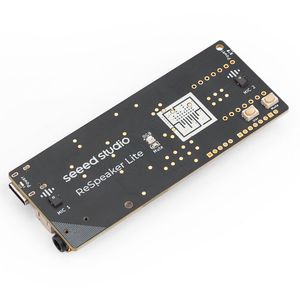
The reSpeaker Lite Voice Assistant Kit includes a two-mic array, a pre-soldered XIAO ESP32-S3 controller, and an XMOS XU316 audio processor with onboard natural language understanding, interference cancellation, acoustic echo cancellation, noise suppression, and automatic gain control. Hooked up a 5W speaker, you can create your own local voice assistant that you can connect to Home Assistant via ESPHome.
-
- Dimensions
-
84x84x21 mm
- Weight
-
96 g
Home Assistant Voice Preview Edition is a privacy-first smart speaker built as an alternative to the likes of Amazon Alexa and Google Nest Mini. It adds voice assistant capabilities, including local-only processing, to a Home Assistant-powered smart home.

Even high-end smart speakers lack the sound quality of comparably priced dedicated “dumb” speakers. A stereo receiver and a pair of bookshelf speakers will embarrass a HomePod. Even a soundbar (some of which have Amazon and Google assistants built-in now) does a better job.
This begs the question: why not just use what you’ve got, or buy something that’s more fit for purpose from the outset? You can add AirPlay to a stereo receiver with an old Apple TV, or you can add Bluetooth using a Bluetooth receiver that connects to a 3.5mm or RCA port. These will work with your smartphone and can be controlled by Home Assistant (assuming your server has Bluetooth).
You can build a relatively simple smart speaker with an ESP32 and the ESPHome platform. Alternatively, you can salvage old speakers like iPod docks with a reSpeaker Lite board, which turns almost any old dumb speaker into a smart one for around $30 and an afternoon’s work.
Picking the right smart speaker is easy when you follow a few basic steps, just like avoiding smart home subscription traps is easy when you know how.


