





As efficient laptops take over the market, beefy machines like the Acer Swift X 14 prove there’s still room for more power. It’s sort of an enigma, because the Intel Core Ultra Series 2 processor inside isn’t anything special — the newer Series 3 platform and Qualcomm’s Snapdragon X2 series both beat it. In fact, the CPU’s weak NPU means it alone isn’t powerful enough to earn Copilot+ badging. The savior for the Acer Swift X 14 is its dedicated Nvidia GeForce RTX 5070 laptop graphics card.
The graphical power, paired with a gorgeous 14.5-inch OLED touchscreen that’s color-accurate, makes the Swift X 14 ideal for creative types. The overall build quality is excellent, too, even if bundling a pen that doesn’t work on the touchscreen is an odd choice. Still, the Swift X 14 finds its place as a niche laptop offering. It’s not efficient or fast enough for productivity workflows, and it’s not a gaming laptop either. Instead, Acer’s Swift X 14 is for those that need a Windows 11 laptop with discrete graphics for applications like photo editing, video editing, and graphic design.
Acer loaned us the Swift X 14 for this review, but the company had no input in this article and did not see it before publishing.


7.5/10
- Operating System
-
Windows 11 Home
- CPU
-
Intel Core Ultra 9 (Series 2) 285H
- GPU
-
NVIDIA GeForce RTX 5070 Laptop GPU
The Acer Swift X 14 is a beefy productivity laptop for creatives with Intel Core Ultra Series 2 processors and discrete graphics. The laptop features a 14.5-inch touchscreen OLED display with full coverage of the DCI-P3 color gamut. The Swift X 14’s fast performance, Copilot+ features, and RTX 5070 graphics make it ideal for heavy workloads, but battery life may leave a bit to be desired.
- Nvidia GeForce RTX 5070 laptop GPU crushes graphics workloads
- Display is excellent and color-accurate
- Solid port selection with TB4, USB-A, HDMI, microSD, and 3.5mm
- Last-gen Intel platform loses to newer, but cheaper, x86 and Arm chips
- No USB-C ports on right side of laptop
- On the thicker and heavier side
Acer Swift X 14 pricing and availability
The base model Acer Swift X 14 comes with an Intel Core Ultra 7 255H, Nvidia GeForce RTX 5050 graphics, and 16GB of memory for $1,599. The next step-up adds Nvidia GeForce RTX 5060 graphics and 32GB of memory, and this configuration costs $1,799. The high-end configuration uses a better processor, the Intel Core Ultra 9 285H. It also features an Nvidia GeForce RTX 5070 graphics card and 32GB of memory. This is the model I reviewed, and it retails for $1,999.
It’s available in one color, Titanium Gray, and includes the Acer Active Pen in the box. You also get a 100W USB-C power adapter included to keep the Acer Swift X 14 charged.
- Operating System
-
Windows 11 Home
- CPU
-
Intel Core Ultra 9 (Series 2) 285H
- GPU
-
NVIDIA GeForce RTX 5070 Laptop GPU
- RAM
-
32GB LPDDR5X SDRAM
- Storage
-
1TB PCIe Gen4 SSD
- Battery
-
76 Wh 4-cell Li-ion battery
- Display (Size, Resolution)
-
14.5-inch, 2880 x 1800
- Camera
-
FHD IR Webcam (1920 x 1080)
- Speakers
-
Two built-in stereo speakers
- Colors
-
Titanium Gray
- Ports
-
2x Thunderbolt 4, 2x USB 3.2 Gen 2 Type-A, HDMI 2.1, 3.5mm combo jack, microSD slot, Kensington Lock
- Network
-
Killer Wireless Wi-Fi 6E AX1675
- Dimensions
-
12.69 x 8.95 x 0.71 in.
- Weight
-
3.4 lbs.
- Price
-
$1,599 (base), $1,999 (as reviewed)
- Adaptor and Battery
-
3-PIN 100 W PD PCE 50%, TCO 9.0 AC adapter
- Keyboard
-
80-/81-/85-key Acer backlight keyboard
- Display type
-
OLED touchscreen
- Audio
-
DTS:X Ultra Audio,
- Connectivity
-
Bluetooth 5.4 LE Audio
Acer’s Swift X 14 is a hefty laptop
The keyboard, touchpad, and ports might make that a good thing
The Acer Swift X 14’s build quality is both a blessing and a curse. From the outside, the Swift X 14 looks tough and well-built, complete with a Titanium Gray colorway and an angular design. This design somewhat hides the laptop’s true size, as it measures 9.76mm at its thinnest point and 17.96mm at its thickest point. The thick display assembly and edges of the main chassis are sturdy. Press down near the center or top-middle of the keyboard, however, and you’ll notice an uncomfortable amount of deck flex.
The laptop’s 3.4-pound weight is on-par with similar laptops in its class, like the 14-inch MacBook Pro. It’s fairly easy to move around or toss in a bag, but it doesn’t classify as a thin laptop due to its 0.71-inch maximum thickness. The Acer Swift X 14 is notably thicker than laptops like the aforementioned MacBook Pro, and it feels less premium as a result. That said, you get a lot in exchange for the thicker build, so the trade-offs might be worth it for some.
The ports are also one of the best and worst things about the Acer Swift X 14. On paper, the selection is incredible. You have two Thunderbolt 4 ports, two USB-A ports, an HDMI port, a 3.5mm combo jack, a microSD card slot, and a Kensington lock. In practice, the Acer Swift X 14’s port selection and layout leaves a lot to be desired.

The main issue is those Thunderbolt 4 ports. They’re the only Type-C ports on the laptop, and they both reside on the left side of the laptop. The Swift X 14 uses the Type-C ports for charging, so you can expect one of those ports to be taken up by the power adapter when the laptop is running off wall power. This will be often, if you want to take full advantage of the discrete graphics.
In practice, the Acer Swift X 14’s port selection and layout leaves a lot to be desired.
I would’ve liked to see another Type-C port, and specifically, one on the right side of the laptop. When I buy a laptop as a consumer, I want to know I can charge it conveniently on either side. With the Acer Swift X 14, I can’t.

I also take issue with the microSD card slot, as a full-size SD card reader would’ve been better. I understand that going with a microSD card slot allows the Swift X 14 to be smaller, but other laptops offer the full-size version. As a creative that works with photos and videos often, perhaps the target audience for this laptop, I have little use for an inbuilt microSD card reader but plenty of use for a full-size slot. This immediately makes laptops like the MacBook Pro and Asus Zenbook A16 more appealing for my workflows.

The keyboard and trackpad are outstanding. The touchpad is large and features a Gorilla Glass covering, and it supports multi-touch gestures. There’s also a stylus included in the box that can be used on the trackpad, but not the display. The touchpad area is big enough to accommodate a stylus (145x92mm area), although the experience is far less enjoyable than using a display pen. Going back to the good, this touchpad uses haptics which allow it to register clicks almost anywhere. The only exceptions I found were the furthest edges at the corners of the touchpad.
The keyboard has a good amount of travel for this laptop’s size, and it makes me want to forgive the Swift X 14’s extra thickness. I picked up typing on the Swift X 14 keyboard quickly with minimal errors. Keystrokes are properly registered even when your finger doesn’t hit the center of a key perfectly. There’s a long function row with multiple Acer shortcut keys, as well as handy toggles for features like airplane mode and mute.
Asus Zenbook A16 review: I’ve never used a 16-inch laptop this light — and it has 18 cores
A lightweight, slimline, powerful 16-inch Snapdragon unit.
The touchscreen is color-accurate and responsive
Paired with the GPU, the screen makes this laptop great for creators
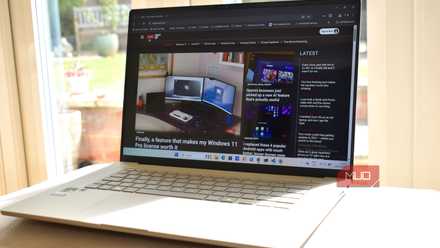
A creator laptop needs a standout display, and the Acer Swift X 14 meets the moment here. It’s a 14.5-inch OLED screen with a 2880×1800 resolution, and it supports 120Hz refresh rates. The display surface is glossy Gorilla Glass, so glare is something to watch out for. Although the bundled stylus won’t work on the screen, your finger will. I don’t use touchscreens on laptops often, but it’s nice that when I instinctively try to tap a button or slider, it actually works. Photo or video editors might find it helpful for scrubbing timelines, rotating images, or adjusting sliders.
The screen has a modest brightness rating of 340 nits, which covers the low end. The display can peak higher than that in HDR mode, but it isn’t the brightest panel on the market. For people who do color-accurate work, the best Swift X 14 display characteristic is its full coverage of the DCI-P3 color gamut. The screen also meets the VESA True Black HDR500 and TUV/Eyesafe certification thresholds. In all, the Acer Swift X14 is as good as you’d expect.
Rounding out the multimedia suite is a decent 1080p webcam and a set of stereo speakers. The laptop also uses a triple-microphone array for voice pickup, and combined with Acer’s webcam enhancement features, it’s a great option for virtual meetings. The speaker system supports DTS:X audio with different modes that optimize the stereo sound for individual content types.
The Swift X 14 is fast, but not fast enough
Discrete graphics are incredible — it’s Intel dropping the ball

The Acer Swift X 14’s performance is a mixed bag. The last-generation Intel Core Ultra 9 285H chip supports a mere 13 TOPS of NPU performance, which isn’t enough to earn Copilot+ status on its own. This laptop loses out in single-core and multi-core tests to newer systems with lower-tier Intel Core Ultra Series 3 processors, and it’s crushed by Snapdragon X2 series machines. The Nvidia GeForce RTX 5070 laptop GPU is what makes the Swift X 14 a viable option for creative work.
Putting the CPU shortcomings aside, the Acer Swift X 14 generally beats laptops without discrete graphics thanks to the RTX 5070 and its 8GB of VRAM. While Arm-based laptops like the Lenovo Yoga Slim 7x will outdo the Swift X 14 in efficiency and CPU performance, it’ll lose out in graphics-based tests and gaming every time.
Geekbench 6 (single-core/multi-core) | PCMark 10 | Crossmark (overall) | 3DMark Wild Life Extreme | |
|---|---|---|---|---|
Acer Swift X 14 (Intel Core Ultra 9 285H + Nvidia GeForce RTX 5070 Laptop GPU) | 2,130 / 12,474 | 6,014 | 1,618 | 15,087 |
Acer Swift Edge 14 AI (Intel Core Ultra 7 258V) | 2,021 / 9,121 | 6,442 | 1,419 | 7,563 |
Lenovo Yoga Slim 7x Gen 11 (Qualcomm Snapdragon X2 Elite X2E88100) | 3,738 / 19,711 | N/A | 1,549 | 9,741 |
Dell XPS 14 (Intel Core Ultra X7 358H) | 2,816 / 15,029 | 7,750 | 1,492 | 11,180 |
Dell XPS 16 (Intel Core Ultra X7 358H) | 2,652 / 14,022 | 7,314 | 1,422 | 11,576 |
You might crave a newer Series 3 processor, and it could be worth waiting for a refresh. The laptop’s connectivity won’t wow you, either. It offers Wi-Fi 6E and Bluetooth 5.4 support, which should be fine for most users but lag behind newer standards. Wi-Fi 7 is only becoming more common, and you want a laptop you’ll probably hold onto for years to support it.
I won’t relitigate Intel’s battery life and thermal woes, but know they’re present on the Acer Swift X 14. This laptop has a 76Wh battery, but it’s not uncommon for light workloads to cause the fans to ramp up and battery life to burn. In about two hours of use, I saw the Swift X 14 use roughly 50% of the battery at max brightness and using the balanced power mode. I wasn’t doing anything strenuous — basic web-based tasks, like writing this review, resulted in those levels of battery drain. That firmly falls short of all-day battery life in my book.
Should you buy the Acer Swift X 14
You should buy the Acer Swift X 14 if:
- You’re a creator that needs a Windows 11 laptop with powerful graphics performance
- You don’t need best-in-class single-core performance from your laptop
- You can live with a thicker and heavier build in exchange for graphics power
You should NOT buy the Acer Swift X 14 if:
- You need the better CPU performance or efficiency offered by Intel Core Ultra Series 3 or Snapdragon X2
- You want a laptop with pen support that isn’t limited to merely the trackpad
- You need newer hardware and connectivity features, like Bluetooth 6 or Wi-Fi 7
The Acer Swift X 14 launched with Intel Core Ultra Series 2 chips, and now, all eyes are on the Intel Core Ultra Series 3 and Qualcomm Snapdragon X2 platforms. It’s clear that the Swift X 14 could use a boost to Series 3, but in the meantime, is this laptop worth buying? For the right price, yes — as long as you consider its shortcomings. The display, keyboard, trackpad, and overall build quality are impressive, but the price-to-performance ratio isn’t as competitive in mid-2026. The bundled stylus that only works on the trackpad is another quirk.
I can look past the price and the performance considerations, but the Acer Swift X 14’s thickness is the sticking point for me. You can get thinner and sleeker laptops with better battery life than the Swift X 14, and that makes it hard to justify lugging around Acer’s creator laptop every day.
- Operating System
-
Windows 11 Home
- CPU
-
Intel Core Ultra 9 (Series 2) 285H
- GPU
-
NVIDIA GeForce RTX 5070 Laptop GPU
- RAM
-
32GB LPDDR5X SDRAM
- Storage
-
1TB PCIe Gen4 SSD
- Battery
-
76 Wh 4-cell Li-ion battery
Acer’s Swift X 14 has incredible hardware, with an Intel Core Ultra 9 chip and Nvidia GeForce RTX 5070 graphics. The 14.5-inch touchscreen OLED display is easily the best part, but the CPU performance for the price isn’t as impressive.


