





A Jellyfin server makes it much easier to consume your media on all the devices you own. By hosting it on a central device on your network, you can stream to any device in your home (or outside of it, with the right setup) without being restricted by the corporations that run modern streaming services.
The question then becomes, how do you stream the content to your different devices? Jellyfin has official clients for most platforms, but we’ve covered a few third-party alternatives on XDA before, which got me thinking about what might be the best option for all the devices out there. So I decided to try all of them.
The only ground rule here is that it must be a client that supports video; there are numerous audio players for Jellyfin, too, but I don’t use them, so they don’t count. I found all the clients I tested through this list on GitHub, if you’re curious.
Android TV: Wholphin (or Void)
A great UI with plenty of options
I started my tests with my Chromecast with Google TV (4K), the device I use most for streaming video, since it’s plugged into the TV in my living room. There are quite a few clients available for Android TV, many of which are on the Play Store, while others require sideloading.
After trying pretty much every option available, Wholphin came out on top for me, thanks to its visually pleasant, smooth UI and some nice flourishes that make it feel more alive without getting in the way of my content. TVs already have a somewhat slow navigation mechanism, so I don’t like it when clients randomly pick content to showcase on the home page that takes up the entire screen. I appreciate that Wholphin defaults to bringing up the “Continue watching” carousel first and foremost, with more content visible by scrolling down.

4 useful Android TV apps that do more than stream movies and TV shows
Android TV apps you didn’t know you needed
It also offers a solid array of settings for things like skipping intros or playing the next episode, and it also presents all the metadata for shows and cast members in a beautiful way.
I’d also give a special shoutout to Void. Unlike Wholphin, this one seems to be earlier in development, but it already has a beautiful user interface with its own visual flourishes that look and feel great, and it offers some more options for transcoding if you want to stream at a lower bitrate, as well as other playback settings that may be useful in certain situations. It’s better if you want a little more control over the experience, but since it’s still relatively early in development, it can be a little buggy.
Beautiful, smooth, and widely compatible
Both TVs in my house use LG’s webOS, so of course, I had to test that too. There are significantly fewer options for native webOS clients, but I still tried all three, and Litefin came out on top for me. Despite hearing about Moonfin, it didn’t become my favorite on any of the platforms I tested it on, and Breezyfin was not compatible with webOS 5, so this one was kind of easy to choose.
Litefin is honestly one of my favorites of the bunch. It has a beautiful UI by default, with a hero carousel that doesn’t hide everything else in my collection, so I still get a good view of my server’s content without needing to move down the screen at a snail’s pace. Everything feels easy to navigate, and even little features like the random button from the official client made it here. Metadata for the content itself and the crew is also presented beautifully, and it just feels like a rich app.
Perhaps the best part of all is just how heavily customizable Litefin is. From the theme to the layout of your content and sidebar, to playback and streaming settings, there are so many things you can change in the Litefin settings, to the point it might be one of the best apps on any platform in that regard.
I don’t have a Samsung TV, but it seems the options are the same as on webOS (minus Breezyfin), so I’d say Litefin wins there too.
All desktops: Fladder
Looks do matter
Desktop was one of the hardest platforms to choose a winner for, partly because of the sheer number of options available, but also because many of them don’t seem that great. I’d start by trying some of the most popular ones on the list, but it turned out some were barely usable to even consider, so I’d try a few more to get a good sampling, to the point where I tried basically all of them too.
What ended up winning for me was Fladder, an app that’s actually available on Android TV as well.
I thought Wholphin and Void were better optimized for those platforms, but on computers, Fladder may actually be the best option, whether on macOS, Windows, or Linux. The app looks and feels exactly the same on all platforms, so it won’t feel the most native, but it does look the best of all of them. This is a beautiful app that makes it easy to access the most relevant content to me, since the main row is “Continue watching”, making it easy to jump back into what I actually want to see. I also like how you can minimize playback and keep browsing your content if you want to, even if the mini player makes video content basically unintelligible due to how small it is.
It’s also easy to jump into specific chapters or episodes of a show, see special features from a movie’s DVD or Blu-Ray release, and access metadata for a given piece of media. It does fall short when it comes to showing more details about a cast or crew member, though — all you can see is information about their birth and other media they’ve been on that’s also on your server.
There are a few settings available in Fladder that I also appreciate, from thorough customization of how to handle credits, intros, and other unnecessary sequences, to the streaming quality settings you’d want to see on a device you might not always use at home. Fladder nails most of the basics while looking great, so it’s easy to recommend.
We have some runners-up
I was initially expecting different picks for each desktop OS, but since they ended up being the same, I wanted to mention some runners-up you might want to consider on each platform.
On Windows, one of my favorites was Hills Lite, available on the Microsoft Store. This app has a design that feels much more native to Windows, solid performance, and better support for presenting more detailed information about cast and crew members. It also has plenty of settings, but some are locked behind a paywall, which is why it didn’t win overall for me.
Linux users may want to try Tsukimi, which similarly feels much more native on the platform, with great performance overall, and a UI largely in line with most GTK apps. Tsukimi does skip out on some more advanced settings, at least for now, and there’s no easy way to choose a streaming bitrate, for example, along with some other things feeling a bit more bare. But as a basic player and browser, it’s fantastic.
Finally, macOS doesn’t seem to have a great native client that’s also free, but maybe VidHub is more up your alley. It’s also a cross-platform client, and it’s not as beautiful but a little more technical, which some may prefer. Still, it lacks options for choosing a streaming bitrate, which I’d consider fairly important.
Android phones: Findroid
Native and fully featured
Unlike most other platforms, I thought the official Jellyfin client for Android was already quite nice, so there was a higher bar to clear. With that in mind, I’d say Findroid was the best of the bunch.
Findroid comes the closest to replicating all the features of the official Jellyfin client, but it has a user interface that’s fully tailored to Android, following Google’s design language. It’s responsive, it looks great, and it’s super easy to navigate on a phone, making it perfect for consuming content on the go. It also displays all the metadata and information about the cast and crew.
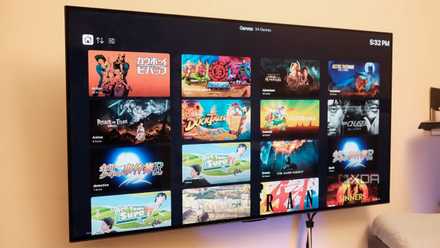
Playback works well with all the general options you’d expect, though it admittedly falls a little short in letting you choose streaming bitrates. I couldn’t find an option to change the default behavior, or even during playback.
If that’s something you need, Void is another great option that lets you change the bitrate on a case-by-case basis. I already mentioned Void for Android TV, but it’s just as good on Android phones, with many of the same features.
iPhone: Moonfin
Or maybe JellyTV or VidHub

Unfortunately, I have no iOS devices to test on that platform, but to be as all-encompassing as possible, I did try to do some research on what options might be good for your device. The highest rated apps that support Jellyfin on the App Store are Moonfin and VidHub, and while I haven’t exactly loved Moonfin on all the platforms I’ve tried, Android was probably where it felt the best, so it should also be a great option if you have an iPhone.
Still, based on me looking around, I’d probably say to give JellyTV a try. It’s designed from the ground up for Apple devices, so it seems to feel the most at home, and the ratings it does have are also very positive. One review does mention live TV doesn’t seem to work, but if I were choosing a client, this is not a feature I would have cared about, so that doesn’t take much away from my opinion on it.
Finally, VidHub is also available on iPhone, and while that hasn’t usually been my favorite on other platforms, it allways felt pretty solid, so it might be worth a shot, too.
Enjoy Jellyfin on all your devices
These options are all terrific alternatives that do a great job of showcasing and playing your library on just about every other kind of device. I tested a lot of these, and there’s more than one good option most of the time, but the above are my top recommendations, so I’d say you should start there.