




I have a lot of smart home automations that can sometimes feel like magic. I still get a small thrill when I sit down in the reading chair in the living room, and the lamp next to the chair turns on automatically. While some automations can feel like magic, there are plenty of Home Assistant projects that can replicate actual magic.
Control your smart home with a wave of your wand
Use Lumos and Nox for real
Both of my kids are obsessed with Harry Potter (almost as much as their dad), so when I saw a post on Reddit about using a special type of wand to control your smart home, I knew I had to give it a try. The project uses Magic Caster wands, which are special wands equipped with Bluetooth that you could use with a discontinued app that recognized certain spells when you performed the relevant gestures.
As is always the case, some legends in the Home Assistant community have reverse-engineered these wands and created a custom component that exposes the wand (and the spell gestures) to Home Assistant.
By installing the Magic Caster Wand Home Assistant integration through HACS, you can use the wand to trigger automations so that if you perform the Lumos spell, your lights really do turn on. Perform Nox, and they turn off again.
Getting your hands on the wands is the challenge. They’re no longer produced, so you have to find them used, and they don’t come cheap. I managed to find one for about $50, but many I saw online were going for a lot more. It was worth it just for the look on my kids’ faces the first time I turned on their lights by waving a wand.
I’ve now set up automations that use the Bermuda room presence tracking integration to determine which room the wand is in. Performing Lumos in my home office will turn my light on, but doing the same spell in my kids’ rooms will turn on the lights in their respective rooms instead. It really is like magic.
- Dimensions (exterior)
-
4.41″L x 4.41″W x 1.26″H
- Weight
-
12 Ounces
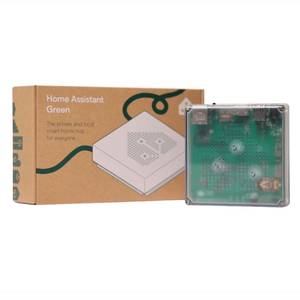
Home Assistant Green is a pre-built hub directly from the Home Assistant team. It’s a plug-and-play solution that comes with everything you need to set up Home Assistant in your home without needing to install the software yourself.
Build your own Weasley clock
Know when your family members are in mortal peril

If you love the Harry Potter books, you’ll immediately know what the Weasley Clock is. If you haven’t read them (yet), then it needs a little explanation. The Weasleys are a wizarding family, and they have an unusual clock in their home.
Instead of pointing to the time, each hand represents a member of the Weasley family, and they point to statuses around the clock, such as Home, Work, School, Traveling, Hospital, and Mortal Peril.
Once again, other members of the community have done the hard work. There’s a simple but effective Wizarding Clock Card that you can install via HACS. The hands will point to the current Home Assistant zone that the person is in or will show as Lost if they’re not detected in any zone. If they’re moving at more than 15 mph, their status shows as Traveling.
Someone else has taken this a step further and built a real physical clock where the hands move to the appropriate locations based on Home Assistant data. If someone is detected as moving above 75 mph, this is when their hand moves to point to Mortal Peril. Genius.
Make a magic mirror
Mirror, mirror, on the wall, what’s the bathroom humidity?

This project has been around for a long time, but it’s still one of the most impressive ways to incorporate your smart home into your physical home without it standing out or looking too much like a box of tech.
A magic mirror places a display behind a two-way mirror, so that whatever you choose to display appears as if by magic behind the glass. You can build one yourself from scratch, but there is a huge community out there that you can take advantage of.
MagicMirrorOrg is a GitHub organization for an open-source modular smart mirror platform. It has a huge list of modules that you can use to add different things to your magic mirror display. As well as a large collection of third-party modules, there are, of course, Home Assistant modules that allow you to display information from Home Assistant on your magic mirror.
You can make your magic mirror as fancy or as simple as you want. You might want just a simple dashboard with a few pieces of information, or you might want to go all in and have facial recognition that will display different information for each person or even maybe tell you who is, in fact, the fairest of them all.
Home Assistant makes magic real
Honestly, I think Home Assistant may be as close to real magic as we’re ever likely to get. It’s incredible what you can do with it. These projects are focused on recreating magical features, but sometimes the true magic is when you write a complex automation, and it works the very first time you run it.