

Whatever hardware you’re running Home Assistant on, there’s probably a spare USB port or two that you can use. You’ll need these if you want to connect some of the most useful accessories to your smart home server.
These should even work on virtualized Home Assistant servers, as long as you configure your VM with access to the USB port in question.
Mesh network radio
Add Zigbee, Thread, and Z-Wave

Arguably the best thing you can plug into your Home Assistant server aside from a power cable, mesh networks allow you to talk to a vast range of devices without depending on Wi-Fi. There are a number of benefits to this, starting with the fact that Wi-Fi networks can become congested quickly when you start adding all of your bulbs, plugs, and sensors.
These low-power networks form a mesh, with powered devices expanding the reach of the network. This network persists even if your router loses power or crashes, and of course these devices work offline. The low-power nature of this technology unlocks a whole world of battery-powered sensors. Wi-Fi is a far more power-intensive form of communication.
Which network you choose depends largely on personal preference, device availability, how much range you need, and your budget. Zigbee is a solid choice for budget-conscious smart home enthusiasts, with arguably the largest selection of devices. Z-Wave devices are generally pricier, but can offer more stability than competing networks, and the Z-Wave Long Range protocol offers unparalleled range.
Thread is primarily used by the newer Matter protocol, and is still finding its feet. Matter (and by extension, Thread) has seen some teething issues but got a nice shot in the arm when IKEA adopted it. To use these networks you’ll need a coordinator like the ZBT-2 (Zigbee), ZWA-2 (Z-Wave), or a Thread Border Router—the majority of which connect via USB.

- Dimensions (exterior)
-
83x83x179mm
- Weight
-
157g
The Home Assistant Connect ZBT-2 supports both Zigbee and Thread, although it must be set up for use with either one of the two protocols. It offers 4x the responsiveness of the previous model, and is designed to be easy to open for modding, with accessible pins and pads.
Bluetooth dongle
Assuming your server doesn’t already have it
USB dongles aren’t the only way to make use of Bluetooth with Home Assistant, but they offer an easy and cost-effective way to do so. If your server already has Bluetooth, you might not need to do this. But many Home Assistant servers do not, including the Raspberry Pi.
I purchased a Bluetooth dongle for my Mac mini, which runs Home Assistant in a VirtualBox virtual machine, since the VM cannot access Apple’s built-in Bluetooth chip. Some devices like smart blinds and other controllers (especially older SwitchBot devices) use Bluetooth for local communication—which is something you should strive for to remove the cloud as a point of failure in your smart home.
If you’re going all in on Bluetooth, you might want to consider adding Bluetooth proxies throughout your smart home. These cheap (usually ESP32-powered) devices use Wi-Fi as a backbone to talk to your Home Assistant server. You can put them anywhere and talk to Bluetooth devices nearby, and even use them for presence detection.
External drives
Run a NAS and media server from the same box

Home Assistant is fairly lightweight (you can even run it on a Raspberry Pi with a mere 1GB of RAM). This means you probably have additional performance overhead to put to use. By connecting external storage drives, you can run a NAS drive or a media server using the same computer.
You can run a NAS or media server within Home Assistant by using apps (add-ons) like Plex or Jellyfin and Simple NAS, or you can use the same machine to spin up VMs and Docker containers that do the same thing. While a NAS won’t put your server under too much stress, a media server that is used to transcode media can be taxing.
You can also back up your Home Assistant server to an external volume which will survive if your main drive does not (though you should also be backing up to the cloud for true redundancy).

- Storage Capacity
-
1TB, 2TB, 4TB, 5TB
- Brand
-
Seagate
The Seagate Portable 2TB External Hard Drive is a compact USB 3.0 drive that makes storing and accessing files on Windows, Mac, PlayStation, or Xbox easy. Just plug it in and drag and drop your content for quick backups on the go.
Sensors and devices that use USB power
It’s just 5V USB
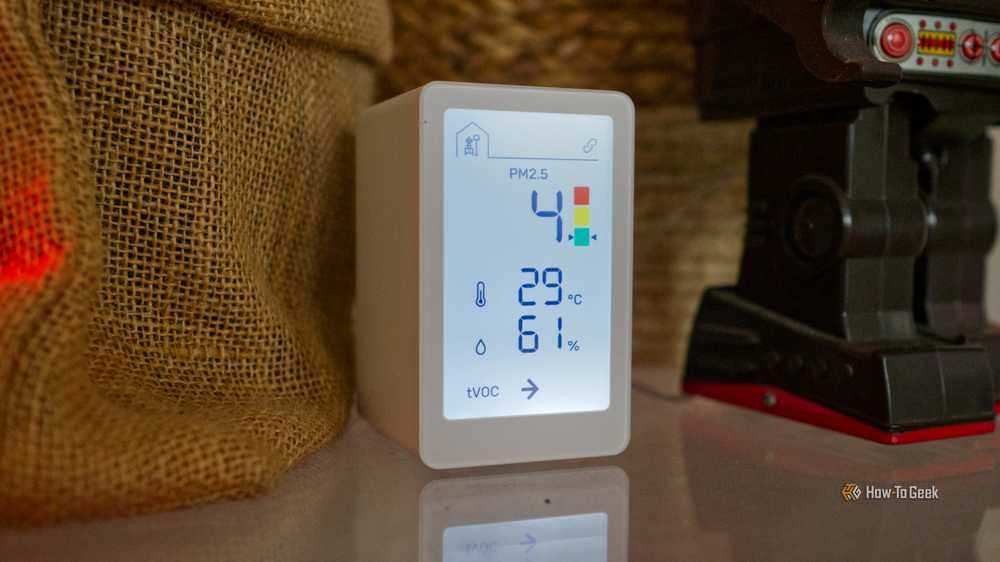
I have my Home Assistant server in the living room, under the TV. Free power sockets are a precious commodity, so I’m using my Mac mini Home Assistant server as a power adapter of sorts. I have my IKEA air quality sensor plugged directly into a spare Home Assistant server USB-C port, since it only draws 5V/1A power and I’m not using the socket for anything else.
The sky is obviously the limit here, with low-power devices like ESP32 microcontrollers running ESPHome being ideal candidates.
It’s worth taking the time to understand, learn, and set up a Home Assistant server if you want to get the most out of your smart home.