




Single Board Computers (SBCs) like the Raspberry Pi and 3D printing technology go together like peanut butter and jelly, and the cost of entry into the world of 3D printers is lower than ever. You can buy a basic 3D printer for as much as a high-end Raspberry Pi, but if you haven’t yet made this particular connection, there are more than a few good reasons to take the 3D printer plunge.
Print custom cases that fit your project perfectly
Infinite variety is a click away
There are numerous commercially-made Raspberry Pi cases you can buy, and they aren’t that expensive most of the time. Injection-molded cases certainly look nice and professional, and if you just have one Raspberry Pi and are going to use it as a standard computer, there’s nothing wrong with throwing one of the official cases in your cart before checking out.
Likewise, if you want a transparent case so you can admire the circuit board and components without exposing your Pi to the elements, an acrylic case is the best way to do it, even if they are relatively pricey. If you’re going to have multiple Pis (it happens so fast) or if you have different specific projects you want to use your SBC for, a 3D printer is the way to go. There are thousands of custom cases for the whole Raspberry Pi family you can print, and, of course, if you have the time and skills, you can modify them or create your own from scratch.
Build hardware that simply doesn’t exist in stores
A customer base of one

While the Raspberry Pi was originally created to make learning to code cheaper and more accessible, it’s now also become inextricably linked to maker culture. There are people making all sorts of very cool gadgets using a Raspberry Pi as the core component behind it all.
For example, that little box you see above on that TV is the “90s Cable Simulator” created by Shane Mason. A faux cable box that recreates the experience of cable TV from the 90s, as the name literally describes.
Of course, it doesn’t stop there. Numerous projects require custom mounts and parts to make the final device work correctly. Whether you’re building a custom arcade machine or a robot, you’ll probably need bits and pieces that you can’t buy off the shelf to make it all work. 3D printers were made for this situation.
Of course, you can always just send your file off to a print farm and have someone else print them for you, but if you’re doing custom projects, this takes away one of the major advantages of 3D printing—rapid prototyping. The ability to rapidly print and iterate your designs will make any project run more smoothly, and it’s worth the price of entry.

- Build Volume
-
256 × 256 × 256 mm
- Connectivity
-
Wi-Fi
The ELEGOO Centauri Carbon 2 builds on the solid foundation of its predecessor and adds an affordable, effective multicolor system to the mix.
Make your Raspberry Pi setups look professional
Doesn’t look like it was made in a cave from scraps
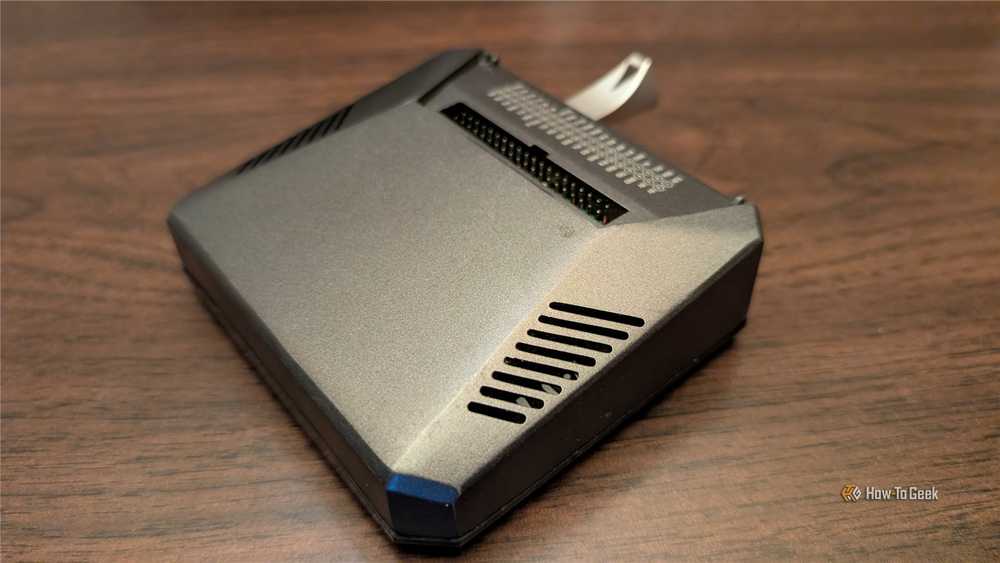
3D printing certainly isn’t the only way to make things. You can use anything from wood to LEGO bricks to craft the accessories you need for your projects. However, if you want your Pi project to look professional or factory-made, 3D printing is the easiest path. Modern 3D printers can produce objects that don’t look miles away from the quality of injection-molded items, and if you’re willing to put in a little effort with the right finishing methods, you can get something that looks better than mass-produced plastic.
Add to this the latest multi-material technology, advanced printing techniques, and interesting filament options that include carbon fiber, wood, and metal-infused filament, and the sky really is the limit. Or, rather, your imagination and creativity are. This is especially true if you’re making a niche item that you want to sell.
For example, there are modifications for the original PlayStation that replace the CD-ROM drive with an SD card reader (as reported in Hackaday.) This modification uses a Raspberry Pi Pico and a 3D-printed mount that elegantly puts the SD card slot where the CD-ROM drive used to be. That’s just one example of how you can make a professional-looking product with your own in-house 3D printer.
Joining a community where Raspberry Pi and 3D printing go hand in hand
As I already intimated earlier, there’s a lot of overlap between the 3D-printing community and the Raspberry Pi community. So, chances are that if you’ve been engaging with the world of online Raspberry Pi enthusiasts, you’ve also been exposed to 3D printing culture. The Venn diagram that includes people who dabble in both might not be a perfect circle, but the overlap is certainly significant.
There have certainly been plenty of people in those communities showing off their projects that rely on some way in 3D printed parts. If you’re already getting access to a community that includes people who can help you make the most out of your Pis using 3D printing, why not go for it?